


Last Updated: November 4, 2026
Quick Summary
To check your naturalization application status online, go to the official USCIS Case Status Online page and enter your 13-character receipt number exactly as printed on your Form I-797C notice. The result shows your current case stage and the date of the latest update.
- Use the 13-character receipt number, not your nine-digit A-Number, because the A-Number will not work in the case status tool.
- Find the receipt number on the Form I-797C Notice of Action USCIS sent after receiving your Form N-400.
- Re-enter the receipt number without spaces or dashes if the tool rejects it, and check for O-versus-0 typing errors.
- Create a USCIS online account to track your case history, view notices, and receive electronic alerts about updates.
- A status of Request for Evidence Was Sent is not a denial; respond to the notice by its deadline.
Table of Contents
- Gathering Your USCIS Case Status Receipt Number
- Creating a USCIS Online Account to Track Your Case
- Checking Your Naturalization Application Status Step by Step
- Understanding Case Status Updates and Common Error Messages
- What the Typical Naturalization Application Timeline Looks Like
- How to Contact USCIS About a Pending Application
- Setting Up Notifications and Getting Help With Your Case
- Frequently Asked Questions
Waiting on a naturalization application can feel like waiting on a letter that never arrives. The good news is that you can check your case status online at any time, as long as you have the right information.
Your case status is tied to a unique identifier called a receipt number, which USCIS issues after it accepts your application. Most of the process depends on finding that number and using it correctly.
Gathering Your USCIS Case Status Receipt Number
Your receipt number is the key to every online status check. Without it, the case status tool will not work, so gather it before anything else.
A common mistake is searching for a different number on your paperwork. The number you need is the receipt number, not your Alien Registration Number (A-Number). The A-Number is a separate identifier, usually nine digits, and it will not work in the case status tool.
Where to Find the 13-Character Receipt Number
The receipt number is 13 characters long, with three letters followed by ten numbers. It appears on the notice USCIS mailed after receiving your Form N-400.
- Check the Form I-797C, Notice of Action, that confirmed receipt of your application
- Look at the top-right area of the notice, where the receipt number is printed
- Check any later USCIS letters, such as appointment notices, which often repeat the same number
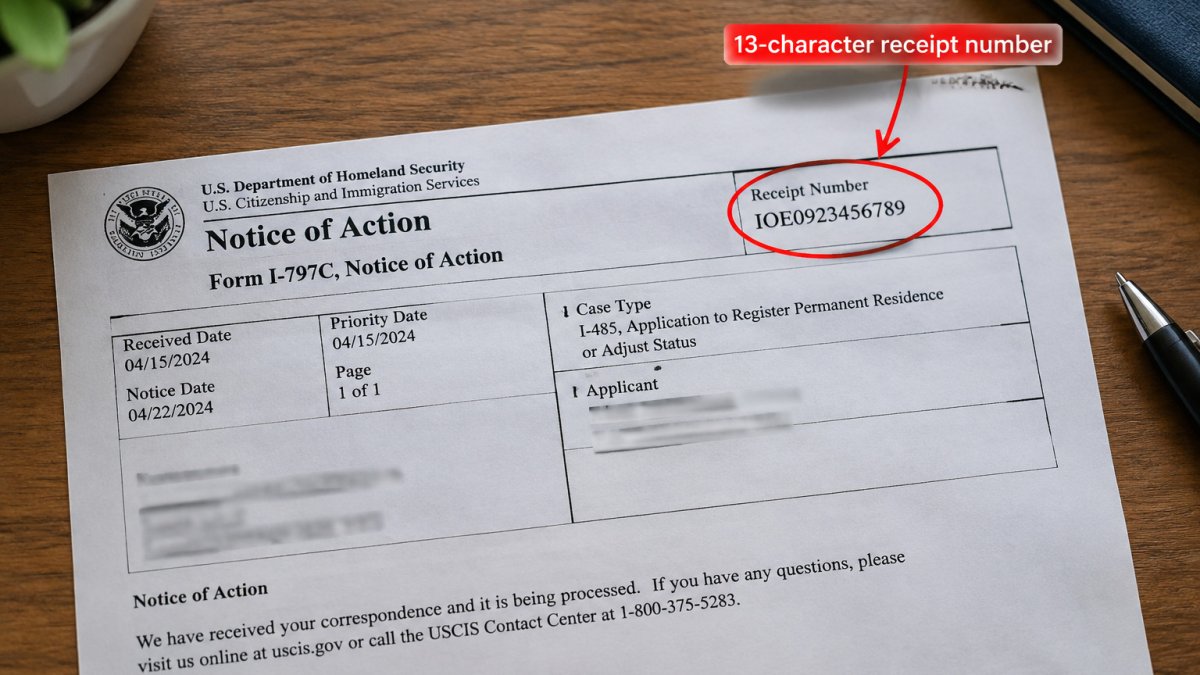
Copy the number exactly as printed, including any letters. Many people mistype the O and the 0, so double-check before you move on.
What to Do If Your Receipt Number Is Rejected
Sometimes the online tool rejects a receipt number. This usually comes down to a typing error or a number that was not entered in the right format.
- Re-enter the number without spaces or dashes
- Confirm that the letters are capitals and the rest are digits
- Make sure you are using the receipt number from your N-400, not an older form
If the number still fails, the case may not yet be in the online system.
Avoid guessing at different combinations, because repeated failed attempts may lock you out for a period of time.
Creating a USCIS Online Account to Track Your Case
A USCIS online account gives you a dashboard for your case history, notices, and updates. It also lets you receive electronic alerts when USCIS takes action on your application.
Start on the official USCIS website and choose the option to create an online account. You will need an email address and a phone number you can access.
- Use an email address you check often, since most updates arrive there
- Set up two-step verification for extra protection
- Save your login details in a secure password manager
Once your account is active, add your receipt number to your case list. If you need to change the mailing address on your account, learn how to update your address with USCIS during naturalization.
Checking Your Naturalization Application Status Step by Step
Once you have your receipt number, the status check takes only a few minutes.
- Go to the official USCIS Case Status Online page.
- Enter your 13-character receipt number exactly as printed.
- Click the button to check your case status.
- Read the status message shown on the screen.
- Note the date of the most recent update.
The result will usually show a short status line, such as “Case Was Received” or “Case Is Being Actively Reviewed.” Write down the status and the date.
If you have an online account, you can also view the full case history there. This shows every step your application has gone through.
The status check takes only a few minutes once you have your receipt number. Here is what to do at each step. (Source: USCIS website for Form N-400, Application for Naturalization)
| Step | What to do | Time or frequency |
|---|---|---|
| 1 | Go to the official USCIS Case Status Online page | Once you have your receipt number |
| 2 | Enter your 13-character receipt number exactly as printed | Just a few minutes |
| 3 | Click the button to check your case status | Once per check |
| 4 | Read the status message shown on the screen | Immediately after checking |
| 5 | Note the date of the most recent update | Keep a record for later contact |
Understanding Case Status Updates and Common Error Messages
Status updates use short phrases that can be confusing, and the online tool sometimes returns an error instead of a status. This section translates the most common status codes into plain English and walks through what each error message actually means, so you can decide whether to wait, act, or call.
What the Common Status Codes Actually Mean
- Case Was Received: USCIS has accepted your Form N-400 and entered it into the system. This is the first status you will see, and it can sit unchanged for weeks while your case waits in the queue. No action is needed.
- Case Is Being Actively Reviewed: An officer has picked up your file. This status can persist for months and does not mean something is wrong. It simply means the case is no longer sitting untouched.
- Case Was Denied: USCIS has denied the application. The denial notice explains the reason and any appeal or motion options, each with its own deadline. To learn what typically leads to a denial, see the common reasons for naturalization application denial.
A status like “Request for Evidence Was Sent” is not a denial. It means USCIS wants more information. Read the notice carefully and gather the requested documents as soon as possible. Some people wonder whether any status signals a denial. The reasons a case is denied vary, and the notice will explain the specific issue.
Troubleshooting the Error Messages You Will Actually See
Most error messages come from the tool, not from your case. Here is what each one usually means and what to try.
- “Case not found” or “Invalid receipt number”: The tool did not recognize the number. Re-enter it without spaces or dashes, confirm the three letters are capitals and the rest are digits, and make sure you are using the receipt number from your N-400 rather than an older form. If it still fails, the case may not yet be in the online system; newly filed cases can take time to appear.
- “Validation error” or a red field: The format is off. Check for a letter O typed where a zero belongs, or the reverse, and confirm the number is exactly 13 characters.
- “System unavailable” or a timeout: The tool is down or overloaded. Try again later, ideally outside peak hours, before assuming there is a problem with your case.
- “Session expired”: You left the page open too long. Reload and re-enter the number.
Avoid repeated failed attempts with guessed numbers, because they may lock you out for a period of time. Stop after a few tries and contact USCIS instead of cycling through combinations.
If an error persists after you have confirmed the number is correct and the system is working, contact USCIS directly and have your receipt number and a copy of your notice ready.
What the Typical Naturalization Application Timeline Looks Like
Processing times vary by USCIS field office and by case. There is no single fixed timeline that applies to every applicant. To see where your application fits, review the full naturalization process timeline.
A typical naturalization case moves through several stages:
- Receipt and filing acceptance
- Biometrics appointment for fingerprints and photos
- Interview with a USCIS officer
- Decision on the application
Your online status will show which stage you are in. Each stage can take a different amount of time, so a long gap between updates is not always a sign of a problem.
How to Contact USCIS About a Pending Application
If your case has not changed for a long time, or if you need to correct information, you can contact USCIS.
Before you call or write, have these details ready:
- Your 13-character receipt number
- Your full name and date of birth
- A copy of the most recent notice you received
- A clear description of your question or concern
Check whether USCIS has already posted a message about your situation. You may also consider a case inquiry, which asks USCIS to review your case status.
If you lost a notice or certificate after approval, contact USCIS promptly and explain what happened. For the replacement steps, find out what to do if you lost your naturalization certificate.
Setting Up Notifications and Getting Help With Your Case
Email and text alerts help you stay informed without checking the website every day. In your USCIS online account, you can sign up for email notifications when your case status changes.
- Turn on email notifications in your account settings
- Add a text message alert if the option is available
- Check your spam folder for USCIS messages
- Update your mailing address promptly after you move
Tracking your case is simple, but naturalization can involve detailed rules and deadlines. If your case has stalled, you received a request for evidence, or you have questions about your eligibility, speaking with a qualified immigration attorney can help you avoid costly errors.
Frequently Asked Questions
How can I check the status of my naturalization application?
You can check your naturalization application status on the USCIS Case Status Online portal at uscis.gov using the 13-character receipt number from your Form N-400 receipt notice. Enter the receipt number exactly as printed, including the three letters at the start, and the system will show your current case status and the date of the most recent update. If the status has not changed for a long period, the portal still gives you a starting point for deciding whether to contact USCIS directly.
Where can I find my USCIS receipt number?
Your receipt number appears on the Form I-797C, Notice of Action, that USCIS mailed after it accepted your Form N-400. It is 13 characters long and starts with three letters, such as EAC, WAC, LIN, or MSC, which identify the service center handling your case. It also appears in your USCIS online account if you filed electronically. Keep this notice in a safe place, because you will need the receipt number for every status check, appointment, and inquiry.
What should I do if my naturalization case status has not updated in months?
Processing times vary, so a status that stays the same for several months does not always mean something is wrong. Check the USCIS processing time tool for your field office or service center to see whether your wait is within the normal range. If your case is outside that range, you can submit a case inquiry through the USCIS online account or contact the USCIS Contact Center. Keep copies of all notices and your receipt in case you need them later.
Can I check my citizenship application status by phone?
Yes. You can call the USCIS Contact Center to ask about your case status, and the automated system can often read back the status for your receipt number. You will need your 13-character receipt number and identifying information such as your date of birth. Phone wait times can be long, so checking the online portal first is usually faster, and the phone line is most useful when the online status is unclear or your case needs a specific inquiry.
Checking your naturalization application status online is straightforward once you have your receipt number and an account. Keep your notices, watch for updates, and act quickly on any request from USCIS. Taking these steps early can prevent delays and keep your case on track.
